How Git Works: .git Folder Explained
Inside Git: How It Works and the Role of the .git Folder
Most developers use Git every day—git add, git commit, git push—but very few truly understand what Git is doing behind the scenes.
This article will help you build a mental model of Git, rather than just memorizing commands.
By the end, you’ll clearly understand:
How Git works internally
What the
.gitfolder really containsWhat blobs, trees, and commits are
What actually happens during
git addandgit commitHow Git uses hashes to guarantee data integrity.
How Git Works Internally (Big Picture)
At its core, Git is a content-addressable database.
This means:
Git does not monitor files. This means that Git does not watch the files you have. Git will only see the files you tell it to. You have to let Git know which files you want it to track. This is how Git works with files. Git and files do not always work together unless you tell Git to track the files.
Git keeps track of snapshots of the content in your project. This means Git tracks what the files in your project look like at a given time. Git is really good at tracking these snapshots of content. When you make changes to your project, Git tracks the snapshot of the content. This way, Git always knows what the content looks like. Git tracks all the snapshots of the content so you can see how your project has changed over time.
Every piece of data is stored using a hash. The data is stored in this way because the hash helps to keep the data safe. When we talk about the data, we are talking about every piece of data that is stored using a hash. The hash is very important for the data.
The data that is stored using a hash is protected. This means that every piece of data is safe when it is stored using a hash. We use a hash to store every piece of data. The data is stored in a way using the hash.
Every piece of data that is stored using a hash is kept private. This is good for the data because it means that every piece of data is secure when it is stored using a hash.
Instead of saying:
The file was modified on line 10 of the file. This change occurred at line 10 in the file.
Git says:
“Here is a new snapshot of the project state.”
Each snapshot is linked to the previous one, forming a history graph.
What Is the .git Folder and Why It Exists
When you run:
git init
When you use Git, it makes a folder named .git. This .git folder is hidden, so you do not see it. Git uses this .git folder to store lots of information about your project, like what changes you made and when you made them. The .git folder is very important for Git to work properly with your project and the.git folder.
This folder is the entire Git repository.
If you delete it, your project will not be under version control anymore. This means that the project and all the changes you make to the project will not be tracked. Your project is no longer under version control if you delete it.
What the .git Folder Stores
The .git directory has a lot of stuff in it.
- It has all the files that are needed for the Git version control system to work properly with the .git directory.
The .git directory is where you can find all of the information about the .git directory and its history.
The .git directory is really important because it helps people keep track of changes made to the .git directory.
All of the commits
All file versions
All branches and tags
All the information that Git needs is the metadata. This metadata is what Git uses to keep track of the history of the things you do. The metadata for Git includes things like the names of people who made changes and the dates when these changes were made. Git uses this metadata to make sure everything is in order. The metadata that Git needs is very important.
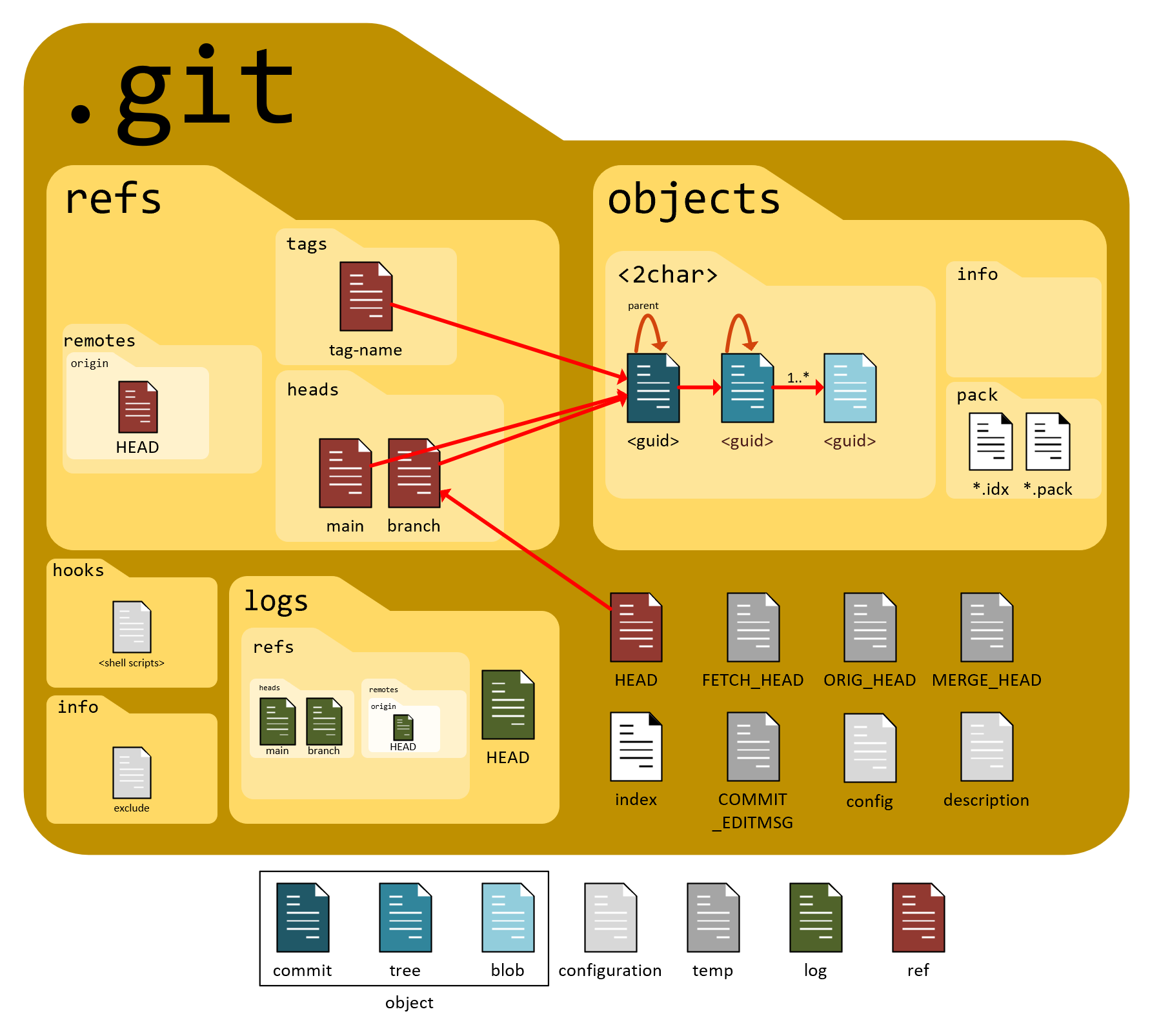
Structure of the .git Directory (Simplified)
Here’s a conceptual breakdown of the most important parts:
1. objects/
This is the database of Git.
It stores:
Blobs (file content)
Trees (folder structure)
Commits (snapshots)
Everything in Git eventually becomes an object.
2. refs/
Stores references like:
Branches (
refs/heads/main)Tags
A branch is just a pointer to a commit.
3. HEAD
HEAD tells Git:
“Which branch or commit am I currently on?”
When you switch branches, Git simply moves HEAD.
4. index (Staging Area)
The index represents:
“What will go into the next commit?”
This is why Git has a staging step.
Git Objects Explained: Blob, Tree, Commit
Let’s talk about Git objects. Git objects are really important in Git. There are several types of Git objects.
The main Git objects are Blob, Tree, and Commit.
A blob is a type of Git object that stores a file.
- It is a file in the Git system.
When you add a file to Git, it becomes a blob.
A tree is another type of Git object.
It is like a folder that holds Git objects, including blobs and other trees.
- Trees help keep everything organized in Git.
Then there is the Commit.
A Commit is a type of Git object that stores a snapshot of your project.
It has a lot of information, like the author and the date it was made.
- Commits are really important in Git because they help you keep track of changes.
So to sum it up, Git objects are made up of blobs, trees, and commits.
These Git objects work to make Git work properly.
Git objects like Blob, Tree, and Commit are essential to Git.
Git stores everything as objects. This is really important to know when you are using Git. Git has lots of these objects. They are all stored in the Git database. The objects that Git stores are the things that make Git work. Git stores all of its data as these objects.
Understanding these three objects is the key to mastering Git.
Blob (File Content)
A blob stores:
The raw content of a file
No filename
No directory info
When you have two files that are the same, Git does something really smart. It only keeps one copy of the file, which is called a blob. This means that if two files have the same content, Git stores only one blob. This helps save space and makes things more efficient. So even if you have files with the same content, Git will still only store one blob for all of those files.
Tree (Folder Structure)
A tree object:
Represents a directory
Maps filenames to blobs or other trees
Defines the structure of the project
Think of it as a folder snapshot.
Commit (Snapshot + Metadata)
A commit object contains a lot of things. It has the file data that was committed. This is what people usually think of when they think of an object. The commit object also contains some other information.
The name of the person who made the commit
The date and time the commit was made
A message that explains what the commit does
A commit object is like a snapshot of the project at a point in time. It has all the information about the project at that time. This includes the commit data and the other information. The commit object is very important because it helps people keep track of the changes that were made to the project. A commit object is used by the version control system to keep track of all the changes that were made to the project over time.
A reference to a tree (project structure)
Parent commit(s)
Author info
Commit message
Timestamp
A commit does not actually store the files themselves directly. It is the files from the Git repository that are stored in the commit. So when you make a commit, the commit is really storing the files from your Git repository.
It points to a tree, which points to blobs.

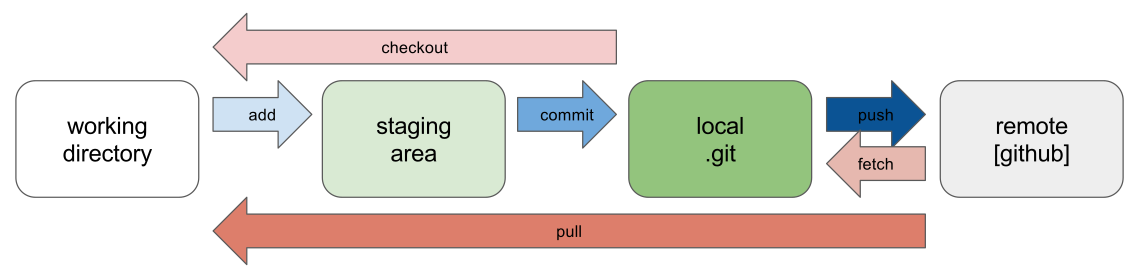
What Happens Internally During git add
When you run:
git add file.txt
Git does the following:
Reads the file content
Creates a blob object
Generates a SHA-1 hash
Stores the blob in
.git/objectsUpdates the index (staging area)
What Happens Internally During git commit
When you run:
git commit -m "message"
Git performs these steps:
Reads the staging area
Creates tree objects for directories
Creates a commit object
Links it to the parent commit
Moves the branch pointer forward
Your project history just advanced by one snapshot.
How Git Uses Hashes to Ensure Integrity
Git uses SHA-1 hashes to identify everything.
Each object’s hash depends on:
Its content
Its structure
This guarantees:
Data integrity
Tamper detection
Deduplication
If a file changes by one character, its hash changes completely.
That’s why:
Commits are immutable
History is trustworthy
Final Mental Model of Git
Think of Git as:
A database of objects
Connected by hashes
With branches as movable pointers
And commits as immutable snapshots
Once this clicks, Git becomes predictable and powerful.
Conclusion
Git is not magic.
It’s a brilliantly simple system built on:
Snapshots
Hashes
Pointers
The .git folder is the heart of it all.
If you understand what’s inside it, Git finally makes sense.